



What is Managed Reporting?
Managed reporting is a business intelligence (BI) model where reports are created by IT developers who are well-versed with concepts like SQL queries or CSV language. Managed reporting is a “managed” process because it is carried out and distributed from the top down by technical users. These professionals ensure that recipients receive reports that are accurate, bug-free, and without technical flaws. Managed reporting is different from ad-hoc reporting, where reports are created by non-technical users.
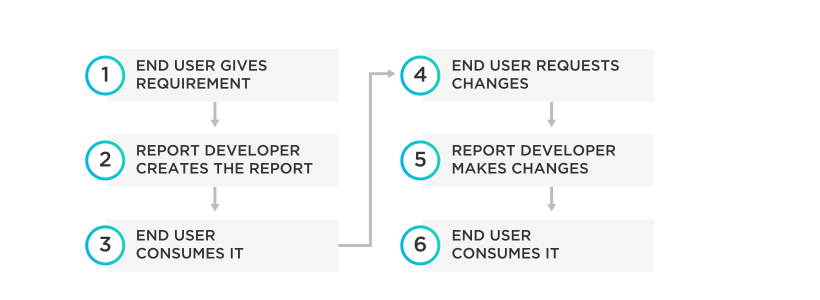
Managed reporting makes the most of BI technology to help end-users achieve organizational goals, both strategic and tactical. The emphasis is laid completely on achieving these goals. For example, a manufacturing company aims to become a market leader and opts for BI with managed reporting as a solution. The reports are related to every part of achieving this goal—from the supply chain to quality control during the manufacturing, delivery times, regulation of inefficiencies, and increase in sales. In this case, a managed reporting solution provides its users optimal ways to:
- Ensure raw material supply chain. This is done with automated lead times and regular stock level checking and reporting. Re-ordering alerts will be developed and implemented. The same principle of a supply chain is applied to manufacturing components.
- Find inefficiencies in the manufacturing process and ways to correct them. This is facilitated through features like dashboards and visualization tools. Managed reporting also utilizes gauges and key performance indicators (KPIs).
- Spot hidden potential across manufacturing segments such as in product lines, target customer base, or even territories. Tools like interactive heat and geographic maps are utilized.
- Increase personal interaction between customers and sales representatives. This is achieved by automating reporting. Merging customer data with geographical location to find sales routes with the most profit potential is another method.
Each of these goals can also be achieved with ad-hoc reporting. However, managed reporting utilizes the technical expertise of a report developer, which is best suited for technical solutions.
{{cta-1}}
Roles and Responsibilities in Managed Reporting
A managed reporting developer creates standard reports that recipients access. They are also responsible for the creation and publication of HTML launch pages based on a set of parameters over which reports can be called up. Besides this primary task, a managed reporting developer has several other responsibilities.
Creating Access Rights
The developer has to create user accounts and groups. Every user who will require access to managed reports will require a user account. Developers have to create these, give each user a role, and specify which group the user is in. Each group can also be assigned to a reporting domain by the developer.
Organizing Access to Metadata
To access a data source, a user needs to first access its metadata. This is crucial information related to the structure of the data, such as the various columns and fields it is made up of, the format it is in, and the location of the source. Using a data servers feature, developers create and access the metadata for any data source to create a report. All metadata can also be further enhanced with the inclusion of descriptions such as business contexts.
Creating Reports for Retrieving and Formatting Data
Business intelligence uses several tools. Key among them are FOCUS, a 4th generation programming language (4GL) primarily used to build database queries. With managed reporting, developers can continuously build complex reports, test them, and deploy, without using FOCUS. Besides creating new report protocols, older procedures can be moved around to improve on them.
Creating Reporting Objects
Reporting objects are representative of data sources. These are used to showcase data in ways that a user will find easy to understand. With the help of predefined reporting objects, users can create and save reports without getting into the complexity of the data sources. Developers are in charge of creating these reporting objects for managed reporting and user dashboards.
Creating Online Analytical Processing (OLAP) Powered Reports
OLAP is a system that enables high-speed multi-dimensional analysis of massive amounts of data. With managed reporting, developers can update metadata files making them OLAP-enabled. This can help create reports and reporting objects that are OLAP-enabled for report recipients. With this, users can choose to view their reports with various data representations without changing the original report or reporting object.
Create and Publish HTML Launch Pages
Once the report is created and tested, the developer will publish it to the web. They will also need to create a launch page—which is a detailed HTML file that documents the report procedure. This page can be further customized with the addition of HTML tags and syntax. This launch page can be set up for any report that is stored via managed reporting. These pages can be both published into managed reporting or merged with self-service applications. They can also be accessed via HTML hyperlinks placed on web pages.
Schedule Reports
All standard reports can be scheduled and distributed with ReportCaster, which enables a developer to provide users with updated information automatically when they call for it. Alerts can also be created, adhering to test conditions so that users receive a notification for when a specific event takes place. A developer will be able to create test conditions matched with data sources. Specific reports can then be generated for the alert. These alerts can be received via email, computers, and WAP-powered phones.
Customize User Environments
A developer can customize user environments by including profiles and personalized help files into domains. The profile can run each time a specific user accesses the managed reports domain. These customized help files can provide elaborate details on standard reports and reporting objects.
Pros and Cons of Managed Reporting
With managed reporting, organizations have a lot to gain. Some of the major benefits include:
- Executive management can easily access all needed information to understand overall organization functioning.
- With tracked data, managers can easily spot business sectors that are performing well or lagging behind.
- Management decision-making is more relevant with updated information.
- Non-performance of individuals, departments, and sectors can easily be identified and remedial measures put in place.
Along with the strengths of managed reporting, there are challenges too. Each business must weigh up the pros and cons and ensure if the process is right for them:
- The volume of information can overwhelm developers especially from large-scale organizations with several departments. Developers can be a scarce resource; is this a good use of their time?
- With the vast volumes of data that come their way, organizations need to make extensive provisions to hold and store information that they receive from multiple quarters. Investing in data warehousing can add to expenses.
- Spotting data that is specifically related to some applications can be tough.
- It is the responsibility of the organization to ensure everyone necessary has the means of inputting data into the system. This can be tedious.
Best Practices for Managed Reporting
There are a few best practices managed reporting professionals should consider implementing in their organizations to gain the most benefits.
Begin with Strategic Goals and Objectives
Every managed report should be created with a specific goal in mind. Why is the report needed? Is it for understanding business drivers, checking on the accuracy of the product pricing, defining success, or analyzing a specific set of data? Once companies establish what the report expectation is, developers can easily narrow down on KPIs for each goal.
Choose Appropriate Key Performance Indicators
Focusing on the right KPIs is a matter of choosing the highest priorities based on the audience. If the reports are for higher management, they are going to be different from KPIs for junior staff. Quality KPI management is crucial to the process of creating managed reports.
Switch to Digital
Manual paper-based practices are in the past. All companies should consider switching to digital reporting for improved, real-time reporting. There are several KPI software programs that can assist business functioning. These programs can update capabilities online and increase cost savings. With these reports, going down to the granular data is easier. Going digital can bring teams on board to work together to create a report.
Balance Data Visualizations
A clarity report is key for businesses. To ensure that the report is well received and easily understood, developers should use visualizations to balance inputs. To choose data visualizations, consider which element works best with the data. It should easily communicate information without clashing with other elements of the report. People can often understand data better in graphical form.
Create Scannable and Drillable Reports
Key features of managed reports are that they have interactive functionality and have customizable options. Creating such reports with select data visualization options can help employees come up with their own set of best practices to create a management report that can be scanned or drilled down as needed.
Imagine being in a meeting and being asked to find the cause of a problem—it is as simple as clicking through the data, no need to run more reports or get back to people later.
Focus on Real-Time Insights
There are different kinds of management reports. Organizations have to know when to utilize real-time insights and make dynamic data available. Real-time insights must be fully aligned to company objectives.
{{cta-2}}
Consider Using Predictive Analytics and Artificial Intelligence
Businesses can extract the most out of the organization’s management reports with advanced management reporting systems. Numerous business-related analytics tools in the market offer multiple solutions.
Predictive analytics, for example, uses historical data to make predictions on possible future outcomes related to overall business performance. Such predictive capabilities help a business prep in advance to deal with possible issues that may arise.
With artificial intelligence (AI), organizations can take their management reports to the next level. Artificial intelligence neural networks can spot trends or patterns in data and will raise an alert for anything unusual. Setting targets or goals for AI to work towards will trigger alerts as soon as they are met.
Incorporate Customer Feedback into Reports
To ensure quality managed reports, use customer service analytics to arrive at conclusions from received feedback. Customer feedback is crucial to organization functioning because it helps in aligning company policies to customer satisfaction. It points out where the digital channels of a company may be going wrong. Creating reports based on feedback can help create a targeted data-centric strategy or to chart a road map for a product. Customized reports can help identify usability problems with the website and can boost customer satisfaction.
To make the most of managed reports, it is important to encourage a data-driven culture across the organization from the top down. Encouraging self-service solutions is a starting point, and this will get people to get into the flow of being data-driven. The internal functioning and work culture of an organization has a significant impact on clients and those working with the business. If the highest value is given to the use of data, it empowers every team member to make the most of reporting tools. This, in turn, maximizes performance without complicating job profiles—leading to employee satisfaction. To encourage this culture, have regular meetings to discuss data and its benefits to motivate employees.
Managed reports help organizations tap into the full potential of BI technology to work towards and achieve strategic and tactical organizational goals. Smart approaches, goal alignment, data visualization, and other such tools make this a value proposition for any organization looking for a way to beat the competition.
Ready to give it a spin?
Start your 30-day trial now.

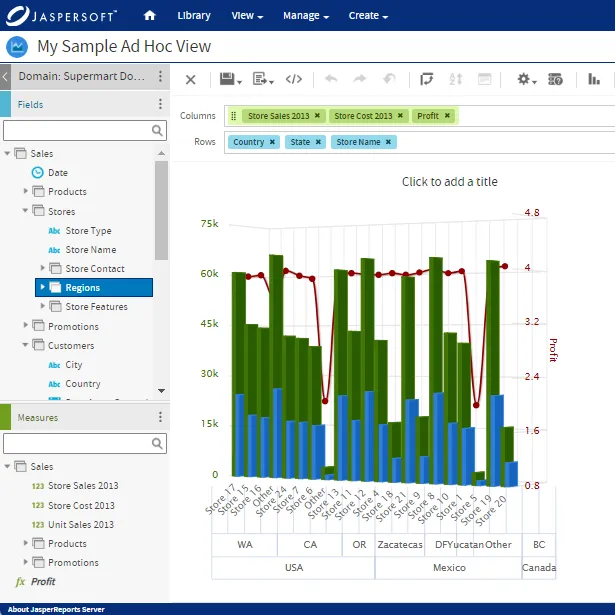
Try Jaspersoft - Free Trial
Efficiently design, embed, and distribute reports and dashboards at scale with Jaspersoft.
Build versus Buy: An In-depth Guide
This whitepaper provides a framework for the decision-making process and critical trade-offs between building or buying an embedded BI and reporting tool.
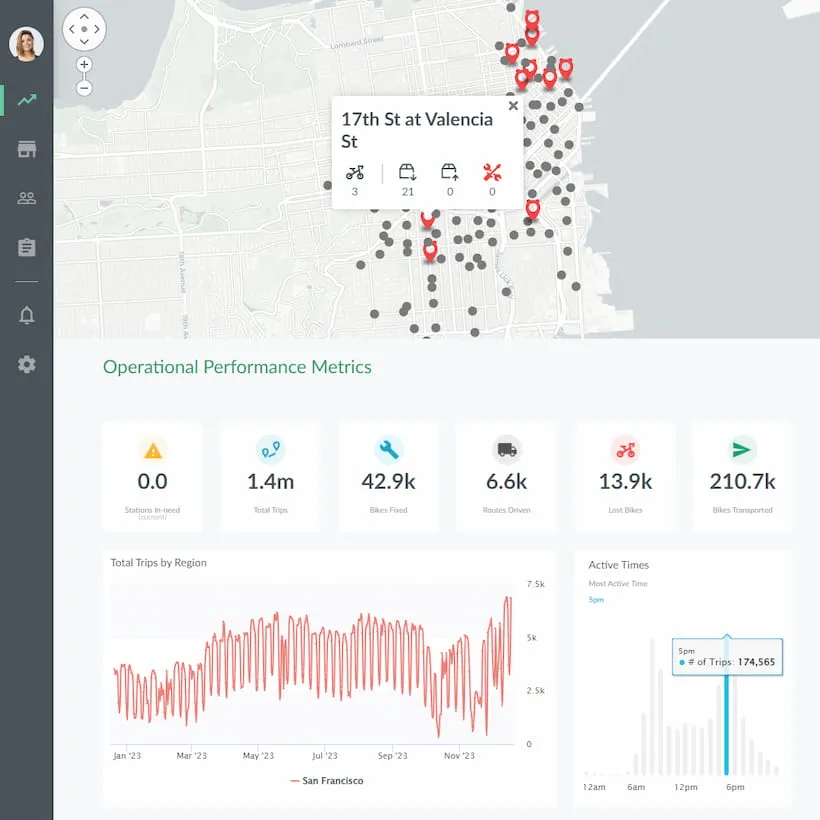
Interactive demo: Bikeshare Embedded BI, supported by Jaspersoft
Experience how to turn data into valuable insights that you and your customers can use to make better decisions.
